Showing posts with label #CENZ14. Show all posts

Wednesday, 21 October 2015

Ignite Presentations and the Inquiry Cycle

At the beginning of term three I set a challenge to my Year 9 Religious Education class - to design aspects of their learning and adapt to barriers that arise. We started by looking at what GRIT, Growth Mindset and critique/ feedback look like. This provided the opportunity for students to realise learning is an on going process and that because they do not succeed the first time, it did not mean they were not developing their skills/ knowledge.
>
I asked them to design a challenge that they would complete focused on religion. To begin with students selected their own topic (I had a range from the Crusades to Secular Humanism). We discussed how to present their learning and one student offered the idea of a presentation style format. They researched different presentation formats and agreed on an Ignite presentation format. A basic run down of the Ignite Format:
  • Google Slides with a maximum of two words per slide - a focus on visual information.
  • Each slide would change every 20 seconds.
  • Students would complete a three minute speech focusing on three questions they had designed.
  • Parents and community members were asked to view the presentations and provide feedback for the students.
I introduced the class to the Inquiry Spiral which was the process we would complete in order for their Ignite presentation. This had a range of steps that I will briefly outline.
Screen Shot 2015-10-09 at 9.58.48 am
Scanning - Students were given time to identify key things related to their topic. This could involve factual information, key individuals or information about potential sub topics.
Focusing - Students formulated questions about one of the areas related to their topic. We focused on creating three Inquiry questions that followed the below format:
Question prompts.
Question prompts.
Developing a hunch - Students selected ONE of the questions they had created and imagined some of the answers or solutions to this particular question. This was a highlight in the process as individuals were able to draw on prior knowledge or ideas they had from another curriculum area.
Learning - Students were asked to think what they needed to learn about in order for them to test their hunch. Key question prompts included - Where will you find this information? Is this information reliable?
I found students were engaged in this process and produced amazing questions that they answered. I was surprised by their willingness to share their learning with their family and other students. When we had our presentation night students were given feedback through the rose, bud, thorn model. I wanted students to enjoy their first Inquiry for the purpose of developing skills/ knowledge rather than receiving a mark. Feedback provided from this model was honest and identified next steps for the students. They felt encouraged by this and commented on the skills they had developed through this process. We celebrated their success and they produced individual learning reflections which we shared on our Google Classroom page.
Learning Reflection after Ignite presentation.
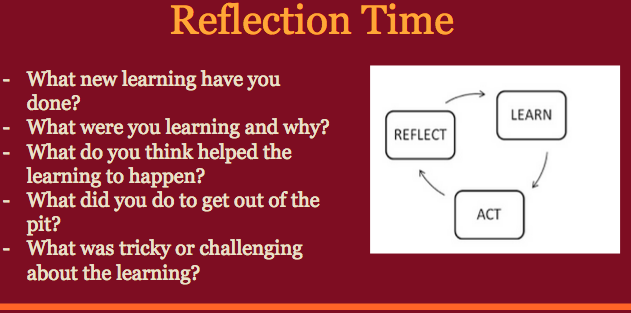
Through this process I saw a massive change in the students attitude to learning and their willingness to take risks with their learning. For term four we are looking at the development of the Catholic Church in New Zealand and look forward to presenting Museum displays.

Jeremy Cumming
Cathedral College

Tuesday, 20 October 2015

Explore The World With Mystery Skype

MysterySkypeThis post was written for the Christchurch Connected Educators blog as part of Connected Educators Month of October 2015. You can read the original post here.
Mystery Skype is a fun activity being played by classrooms all over the world and presents a fantastic opportunity for students to become “global citizens” as they meet other students from around the country and globe. On their website, it is described as:
Mystery Skype is an educational game, invented by teachers, played by two classrooms on Skype. The aim of the game is to guess the location of the other classroom by asking each other questions.
SkypeThe St Andrew’s College Preparatory School has completed many Mystery Skype sessions now, ranging from students in Year 3 through to Year 8 and the students always thoroughly enjoy the challenge of guessing the location of the other classroom. So far we have played with schools in:
Given the time zone of New Zealand, there are many parts of the world where it is virtually impossible to connect (although check out this Skype we did with the Viking Museum in York, where students came before breakfast to connect)
The Mystery Skype to Russia was one of the more exciting and challenging Skypes, as the class was very small and every student appeared to have a different nationality. It turned out that it was an International School set up by Shell Oil and all of the students had parents involved in the oil industry. Here is a video of our Mystery Skype (If you’re interested in recording your Skype calls, check out this affordable plugin):

It’s interesting seeing how different teachers have prepared their students to play Mystery Skype – the American schools often have very formalised “jobs” where some students are researchers, others are questioners, whilst others hold up signs confirming if a question was answered correctly or not. Ultimately, it’s up to each teacher how they choose to play, but preparing students to think about how to ask effective closed questions is critical since answers can only be “yes” or “no”.
The temptation for students to zoom in and ask very detailed questions is almost overwhelming. For example, given the amount of American and Australian television we have in New Zealand our students can guess the accent of the students very quickly, but they tend to then ask very narrow questions such as “Are you in Los Angeles?” or “Are you in Sydney?” Teaching the effective use of atlases is really helpful and can then lead to more useful questions such as:
  • Are you landlocked?
  • Are you north of the equator?
  • Are you on the West Coast?
One of the real privileges I have had helping classes with Mystery Skype is the sharing of Māori culture with other schools that may never have seen any aspects of it before. The students in our Preparatory School jump at the opportunity to sing waiata and perform the College haka and invariably the students overseas love it:

Mr Craig Kemp, the teacher at the school in Singapore and an ex-pat Kiwi, tweeted the view from his classroom:
CONCLUSION:
Mystery Skype is a fun way to connect with classes all over the world and I would really encourage you to give it a go. It is easy to find other classes thanks to the Mystery Skype website and our experience has been the other teachers are thrilled to find classes in New Zealand because they are often “so far away.” Once a connection is made, it is fun to then re-connect and ask questions of the other class for curriculum related topics e.g. if you’re studying weather patterns or transport, why not Skype that class in the US and find out their experiences or views on these things? Finally, Mystery Skyping is contagious – once classes find out their friends in different classes have done it, they start asking their own teacher to get involved. Have fun!
Sam McNeill - Director of ICT at St Andrew's College, Christchurch 

Friday, 31 October 2014

Three Inspirations

As part of Connected Educator Month, #ChchED has done 31 Days of Blogging. To round this off, the committee are giving a quick overview of three key people/groups who have inspired them to be connected educators themselves.

Matt Nicoll
St Andrew's College

  • ChchED Committee
  • edchatNZ Conference Steering Committee
  • scichatNZ Committee
  • edSMAC Co-Founder

ULearn12 was the big change for me for becoming a more connected educator. Twitter and VPLD were the first avenues I used to be more connected, then I started to take some risks with making my pedagogy and keeping an blog to share these risks and innovations. But to take these steps, I needed inspiration from others:

1. KEVIN HONEYCUTT
Website: http://kevinhoneycutt.org/
Twitter: @kevinhoneycutt

Kevin was one of the Keynote Speakers at ULearn12. Just watch the first fifteen minutes of his talk and you might get an idea why he is #1 on my list:


Don't wait until it is perfect to get started, just get started. I didn't wait to be any good at filming my teaching and posting it on YouTube and our class blogs. They are not perfect, but they are useful to my students and to many others. Thank you to Kevin for giving the inspiration and courage to get started!


2. DANIELLE MYBURGH
Website: http://missdtheteacher.blogspot.co.nz/
Twitter: @MissDtheTeacher

When Danielle started edchatNZ, and its respective fortnightly twitter chat via #edchatNZ, she was still a Provisionally Registered Teacher! From modest beginnings in 2012 (after ULearn12...), Danielle has been a "lone nut" leading an amazing team which brought us the first edchatNZ Conference in September 2014. I am proud to say that I am one of her most ardent followers and feel privileged to be able to call her a true friend. Every time I am in Auckland, catching up over coffee is always an inspiring highlight of my trip. Watch this space; Danielle is one to watch!

edchatNZ itself is probably the main reason that Danielle ranks so highly on this list. Via edchatNZ, I have built a really strong PLN and received great feedback for my own blog and ideas. Via edchatNZ, I have got help with units (or even just the teaching of individual concepts) that I thought were a bit "stale" or just wanted more variety with. Via edchatNZ, I have found the courage to share my ideas, and even to help build some other communities, such as edSMAC, scichatNZ and ChchED.

3. BRENT CUMMACK
Sorry, Brent is not on twitter, nor does he have a website or blog. This does not make him any less "connected" but it does mean that I will need to email him about this post, instead of letting my PLN wheels do the turning for me.

Brent is my Head of Department. He is on this list because of the faith he has shown in me, and the opportunities he has afforded me. He is also here because he is a voice of rational reason when I start getting ahead of myself with my "great ideas!"

In 2013, Brent and I both went to the International Conference on Thinking (ICOT 2013) in Wellington. We were both inspired by what we were exposed to and driven to make changes in our own department. Brent then organised for us both to visit some great schools in Melbourne, Australia.

Brent is a wonderful leader of our department. He has made me feel valued, while also offering much-needed advice and critique. He is open-minded to ideas, so long as they are based upon sound pedagogy and match the goals of the department. He has encouraged me (and others in our department) and never been an obstacle in the way of innovation. He is not an advocate for "we've always done it that way", so he belongs squarely at #3 for me.


Bridget Compton-Moen 

Selwyn House

It was very hard for me to narrow down to just three people who inspire me as I get amazing ideas from every member of my PLN. So I've decided to share three blogs I consider must- reads. I've also chosen to share international blogs as many of the educators who inspire me are kiwis and I suspect you'll know them well!

In no particular order-

1. Langwitches- This is a truly amazing site with lots of amazing information for connected educators. There are so many treasures here I'm not sure which to highlight but this is a must if you have or are considering setting up a class blog. Silvia Tolisano is truly inspiring.

2.  WhatEdSaid- Edna Sackson is an amazing inquiry teacher who teaches in a PYP school like myself. Her posts are always thought-provoking and challenge me to ensure that there is an inquiry disposition in my class. She is awesome! Two other amazing inquiry teachers are Kath Murdoch of JustWondering and Maggie Hos-McGrane of TechTransformation. Maggie teaches in the most incredible school in Mumbai so her blog combines two of my great loves; inquiry and India!

3. NerdyBookClub- This is a must read for anyone who teaches literacy or loves reading! It was started by the incredible Donalyn Miller (The Book Whisperer) but the posts are crowd-sourced. If you are anything like me, you'll spend a lot of your time finding the perfect book for your students and this is where I find reading material to check out for my learners. Add it to your feedly!

Ok, so I snuck two extras in there........ all five of these blogs are fantastic. Enjoy!


Tuesday, 28 October 2014

Gadget Girls

How do we get teenage girls interested in "techie clubs" and not see them as "geeky clubs"?

In the Primary years I have observed that it is cool to be a "tech wizard" or "tech angel" or have a "genius hour", however, something shifts for teenage girls when they enter Secondary School.  Partly I see girls with diaries more chocker than my own and between sport, dance, drama, future problem solving and other various clubs they simply don't have room to squeeze anything else in.  Lunchtimes are precious social times to chat, hang out and to get a bit of chill out time amid the busyness of the school day.

I understand all this but I can't shake this desire to learn with our digital natives and utilise their expertise across the school in terms of providing leadership opportunities in a field where our students are often leaders. I love finding out what technologies the girls enjoy using and believe that, as teachers, we can harness that knowledge to make learning an engaging and authentic experience.

I have had a couple of different roles over the past two years (Library and e-Learning Centre Manager & Digital Learning Facilitator) that have taken me outside of the traditional classroom environment.  Within these roles I have tried to kick start a number of e-Learning initiatives for our girls such as: techie brekkies, tech angels, genius bar...  I was starting to feel a little despondent as nothing seemed to take off... or not really!  As a PE teacher it was always easy to get numbers for Netball or Tennis... As an English teacher - no problem getting a debating team up and running so where was I going wrong?

I started chatting more to the girls in an informal way and tried to really work out what might swing the techie club from being a geek club (the feedback that I received) to something fun, exciting and a bit cool.  So, I targeted Year 9 and launched "Gadget Girls".  I didn't really have any idea how it would work but I put it out there as a girly group to come and play with gadgety things (here is the flyer that I sent out). 

What's happening now...

We have Gadget Girls every Thursday lunchtime and it's rocking!  Here are a couple of game changers, making Gadget Girls a success over the other flops (or as Ewan McIntosh - @ewanmcintosh would say First Attempts In Learning) 

Keep it light, fun and social. If it's in the lunchtime the girls want to chat and eat. Which brings me to my next point...

Bring food - a box of Favourites was hugely appreciated by my girls.

It's important to have a few cool techie tools to get things kick started so that the girls feel that they are going to get something out of the group.  As we're a GAFE school I started with that and introduced them to a few things that they hadn't been exposed to.  They're loving Google+ and we're playing with the idea of a little monthly Gadget Girls episode - using Live Hangouts on Air.

So, the biggest challenge has been overcome (getting the girls there) then it's important chat to them (or rather listen to them) and find out what they like and let them take reins.  Instagram and photo sharing are top of the list for our girls. We have set up our Instagram account and are about to get going with it.  We also plan to do some cool things with photos and Makey Makeys.  I'm not sure how this will work yet but the girls will problem solve and we might need to skype Tim Carr  from Mindkits (@MindKits) to help us along.  

A few other little extras:

Have music playing 

Set yourself up in a nice environment - we are in our beautiful Library and e-Learning Centre.  It's a fabulous space where the girls like to hang out.

Be visible! I had a couple of girls join because the saw us through the glass windows having fun. One of them said "What's this girly group?  It looks fun, I want to join".

I know it sounds funny but make sure the girls like the name.  Gadget Girls was a goodie for our girls.  After a few get togethers I asked if they liked the name and whether they wanted to change it. I got a thumbs up from all - it's a keeper (thanks to  @juliePeterson for that one).

All in all I am letting the girls steer Gadget Girls in the direction that they want.  It's really easy to tell if I have a suggestion that they don't like... largely by the silence!  So we move swiftly along!

Technology failed us this week and we couldn't get Google hangouts working (not to mention I forgot the Favourites).  I was feeling like it was all a bit of a disaster really but  it was a lovely moment when I heard the girls say as we finished up:
 "I love Gadget Girls"
"Yeah I look forward to Thursday lunchtimes"
"It doesn't matter if it doesn't work, it's fun just finding out about all this stuff"

I'm relieved it's not all about the chocolate!


Monday, 27 October 2014

Libraries are not just books

Desna Wallace, Librarian Fendalton Open-Air School
Twitter @edna33, booktrailers4kidsandya.wordpress.com

We all know teaching and learning are changing everyday but it is not just in the classroom that changes are happening. When was the last time you had a good look at your school library and the changes happening within?

Libraries are no longer just a place to house books with a gatekeeper glaring at you the moment you start talking. Today they are vibrant, often noisy places with full-on learning and activity. While students are able to borrow books as always, they now can borrow e-books and audio books. A good school library management system and OPAC provides access to so much information, much of it through databases not otherwise publicly available. EPIC databases, for example, guide students through an array of information with the hard work already done. For younger students the advantage is that the sites are safe and secure.

A modern learning library environment offers the flexibility of movable shelves, open spaces, use of Ipads, laptops, smart phones and the like. QR codes plastered on the walls or inside a book can take students with just one click or swipe, to reviews of the book, or websites with further information. School library blogs and websites can offer support both at school and home. Lunch times in a school library might hold book clubs, creative writing classes and even knitting clubs. Both classroom teachers and librarians need to work together with the new technologies to provide the best opportunities for our students to learn and encourage a love of reading. 

A good library needs a librarian who is willing to support students in their search for a great read, a new author or help in navigating the Internet. A good librarian knows their stock and knows their students and can match child and book or website together. A good librarian offers support to teaching staff, often being ahead of the game with content curation and compiling items, websites etc in readiness for a topic. So it saddens me that there are many schools without a librarian. It saddens me more, that some schools do not even have a library. 

For some schools without a library it seems that books will be placed throughout the classrooms or learning environments (which is great as classrooms should always have plenty of reading material available). However, sadly there is still no special place to visit. A library is far more than just books. It is a safe haven for those students who don’t do sports, the child who struggles with the social skills to fit in but feels safest in the library, surrounded by books and a librarian who will watch out for him or her. 

Having spoken to a number of teachers from different schools, there is a distinct feeling that the school library is such a special place to visit that the loss of a library would be devastating. I asked them, would they take time in their busy day to sit in a corner of their class and look at the books and encourage children to take some home. Their answer was a unanimous no. They love visiting a library , checking out the displays, new items, and the chatter as children pick up a book, talking amongst themselves over the latest Guinness World Records. Choice does matter, serendipity matters. A five year old relegated to only the books in his class may miss out on the opportunity to find a book that will be one he remembers for a life time.

Keep your librarians, and keep your libraries. We all want the same thing at the end of the day; children who grow up literate, able to learn, able to take ownership of their own learning having a love of reading.

Popcorn and poetry for National Poetry Day - from: http://library.fendalton.school.nz/


Information and Research in a Digital World


Preparing students for academic research that goes beyond Google.
Cathy Kennedy, Library Manager and Teacher with Library Responsibility, St Andrew's College


Recently the School Library Association made available a unit of work for librarians to use entitled Tertiary Transition. This unit is intended for Year 13 students and to prepare them for the world of academic research. Universities and Polytechnics are telling us that students are arriving with skills ranging from none to some to getting there! This is a great unit and it is fantastic that SLANZA have made this available but I can help a niggle in the back of my mind that such a unit shouldn't be needed – surely we have had these students for the last 8 years in primary school and 5 years in Secondary school to prepare them for tertiary information seeking? I have no doubt that we have all seen this lack of skill in our students, an over reliance on 'googling' and a research mentality that lacks depth in their variety of sources or an inability to identify a credible source or evaluate a source with confidence. Why has this come about and what can we do about this 'google' generation who think everything they need is just one quick search away and will appear in the first three results on the first page of the search? (By the way, don't think I don't love Google – it makes my life easy and I'm a big fan but there is a 'time and place' for using a general purpose search engine when embarking on research for open and complex questions.)


Here's my unscientific take on it and below some of things we are doing to try and turn the tide! None of this is earth shattering or new – just my current journey which still has a long way to go.
WHY? They think they know – They don't think we know – We think they know    

They think they know
Just because our students are confident in a digital world it does not mean they are competent. They have grown up surrounded by the digital landscape and are assuming that they are carrying out research competently – their own confidence and comfort in the world of 'google' (or general purpose search engines) means they don't think that there is anything else - but you don't know what you don't know. They are confusing finding popular information with finding academic information and that they way to do each of these is the same (see graphic from Massey University). Students are confident in their approach to research and if they can't find what they need, they assume it's not there to be found! Their very confidence (but lack of competence) in searching is their very downfall. We need to ensure that we explicitly teach how to carry out academic research (appropriate for the level) and all the critical evaluation, note-taking and synthesising skills that go along with it from the early school years.

They don't think we know
I have come across resistance in students who believe all they need is Google and Wikipedia and they are set. I've been openly challenged (all be it politely) on what would I know? "You didn't grow up with the internet, Mam!" Once again, their digital confidence (and in some cases, arrogance) can be barrier to learning new digital searching skills. Convincing students that even though we are 'old', we do actually know how to navigate the world of digital, academic information. I find it only takes one to two demonstrations and the appearance of just what they need for their research to convince students that there really is a 'deep web' out there that they can tap into.


We think they know (we could list many sayings about assumptions here…) I think this is one that is now changing but some of this came about from the 'digital native' tag. I know I was guilty of this one for a time assuming that these creatures of the digital age could navigate the world of digital information with more knowledge and competence than me and I was working on the assumption that students were accessing everything they needed. Feeding this was probably my own steep learning curve as the information revolution took hold. Of course, this digital ability by some kind of osmosis or courtesy of the year of your birthday is ridiculous. At the end of the day, information literacy skills have not changed - reading, critical thinking, evaluating sources, note-taking, creating citations are all the same but the places and way we search and the tools we use have changed dramatically. As I began working with students many told me that teachers always told them to make sure they had a variety of sources, "don't just google it!" but they had no idea where else to search – googling was their one and only default position. Don't assume our students are good at any of these information literacy skills (digital or otherwise) or that they will carry them over from year to year or even from topic to topic – they are complex and require explicit teaching and practice across all curriculum areas and all year levels.


Here are some 'stream of consciousness' thoughts about ways I've begun to fight the 'I'll-just-google-it' generation.
  • Start with the teachers. Giving teachers the understanding of the 'deep web' and how to access academic databases is very powerful. For two years I ran a Professional Learning Group covering our own library catalogue and the secrets it could reveal, research databases, New Zealand Sources, our online Encyclopaedia, evaluating sources, how to 'google' better, note-taking, creating bibliographies and citations and the overall information literacy cycle. 
  • Working with classes and target year groups – no brainer. Working with the Year 9's we have created a unit of work with the social studies teachers to work through the research steps and explore digital sources beyond a general purpose search engine. These were not 'one off' lessons but my input was part of a complete unit of work requiring a research component. These sessions included using our catalogue, accessing databases (via EPIC), how to 'google' better (Power Searching with Google), using a variety of search engines and evaluating sources.
  • As above, I have worked with students from Years 6 to 13 when they are about to embark on an inquiry or an internal assessment with a research component. Reminding and demonstrating to students where these sources are and how to find them. Don't hesitate to show students again and again or give quick reminders. One of our history teachers noted that the students used a variety of sources very well in one internal but didn't transfer any of that learning (as expected) to the next internal! They do need reminding not to fall into the 'just google' habit. I know many students are probably sick of this mad library lady! 
  • However, having said the above – teach them how to 'google' better. To hone my own search skills in Google I worked through the Power Searching with Google tutorial. This is an informative, self-guided and paced tutorial which gave me some key content to then share with students – would highly recommend this for anyone with an interest in information literacy. http://www.powersearchingwithgoogle.com
  • Make finding the 'deep web' easier to find and create a 'one stop shop'. Our Library Homepage has become the launch pad to a variety of sources with all the necessary password information that students need. If it's too hard to find or too many clicks away they will give up. I tell students that they don't need to remember all the different places I teach them to search - just remember the library homepage and that will lead them on from there.
  • Provide a good online Encyclopaedia and digital library. We have subscribed to World Book Online and other World Book digital libraries. This provides a digital, credible and reliable source and a great starting point for a topic. When you don't know much about a topic, searching effectively or critically can be difficult. A simple overview of a topic can lead to the formulation of effective keywords and the ability to identify valuable information. Wikipedia can fill this role nicely as does Encyclopaedia Britannica which comes free as part of the Epic databases available to all schools.
  • Start young! I begin teaching our Preparatory children as early as Year 4 about digital sources and start with our World Book Online. We use language like credible and reliable as early as possible and are showing our younger students what a 'variety of sources' truly means – not just lots of different websites they found on google!
  • Teach how to critically evaluate a source. I have done this with classes from all levels and found it is best done as part of their inquiry, assignment or internal. There are many acronyms out there to help students think about sources. For many years I resisted using CRAAP but it's clear and students remember it! http://library.macewan.ca/craap_test
  • Start all talking the same language. In our Preparatory School, I have been involved in the team re-working our Inquiry model. At times we might think we are re-inventing the wheel but it means that students will year after year, hear the same language and messages around research from teachers – it's all about teachers being on the same page which impacts on student learning.


Where to from here – lots, lots more to do. Working even more alongside classes and teachers and formalizing programmes of work that ensure these skills are taught and practised is the big challenge for me. We've only begun this journey and there will be many of you out there who have got some great initiatives running in your schools in order to create students who are information literate in this digital world – I'd love to hear your stories!


Sunday, 26 October 2014

Green Screen Images: Learning Alongside Year 6 Students

This blog post is from Glenys Williams, Assistant Principal at Fendalton Open-Air Primary School

Follow Glenys at: @glenysmwilliams, gwplreflections.blogspot.co.nz

Last week I was working in the Year 6 classes at school. The leader of our senior syndicate asked me to help her students create a slideshow showing their recently made Wearable Arts costumes to celebrate and share the product of their inquiry. She had an end goal in mind but wasn’t sure how to achieve it. How could the students place a photo of themselves in costume against an alternative background? She set me the challenge of finding out.

During the morning I worked with a small group of interested students. Together we suggested ideas, Googled, used Help menus and problem-solved to discover, trial and record the solution. This focused but largely undirected learning stimulated amazing conversation about the features, techniques and tools within different applications.

By the afternoon the students and I were teaching their Year 6 classmates how to create Microsoft Powerpoint slides showing themselves in costume in front of a relevant (or funny!) background. Below are some examples of what the students independently created.


While I could have asked around the staff to see if anyone could teach me this new skill, learning alongside the students and discovering the solution for ourselves was incredibly powerful and highly motivating. The process of suggesting solutions, trial and error, helping and supporting each other made the discovering just as exciting and meaningful as creating the end products. Teaching their peers then gave the students the opportunity to consolidate their new learning.

At the end of the day the children and I were buzzing. We couldn’t wait to share our photos and celebrate our success. It was just another example of why I love being a teacher. To live in a time when we have access to amazing technology is such a privilege so I believe it is important we utilise these tools to their full potential while remaining mindful of how we use them and why. 

Thank you for setting me this challenge Judy. I look forward to the next one!

Create. Learn. Share. Enjoy.

Instructions for how to add a background to a green screen photo:
1. Take a photo of a person or object against a plain background (e.g a sheet. Green is preferable but not essential).

2. Take a photo of a landscape or save a Creative Commons image from the Internet.

3. Open Microsoft Powerpoint (2010 or later).

4. Select a slide style e.g. White.

5. Delete any text boxes or other formatting guides.

6. Insert>Photo>select source for the green screen photo of the person or object.

7. Format Picture>Adjust>Remove background. The background to be deleted will turn purple. Adjust this using the sizing handles. 

For more detailed information about selecting the background for removal type “Remove a picture background” in the Help menu.

8. Click outside the picture to remove the background.

9. Insert>Photo>select source for your landscape image.

10. Arrange>Send to back

11. Resize the background to fit the slide if needed. Place the foreground image where desired.

Saturday, 25 October 2014

Creating Content

By Lisa Dillon-Roberts, Principal, Merrin School
principal@merrin.school.nz

It is no longer news to anyone that Technology has and continues to transform our lives.  It seems that as one great device or piece of software is launched into our worlds, another falls off into the abyss of non-popularity.

But one thing remains constant, our need to create, present and curate content.

Our personal and professional content is everywhere.  It’s on our phones, on our laptops, and more than ever it is now in the cloud – blogs, Facebook, twitter, YouTube, the list is endless.

How long before our content is accessed via accessories we wear e.g. watches and glasses and by standard home appliances e.g. TVs and fridges?  Will you be able to access your content from the passenger seat of your car in the coming years?

So what are the ‘real’ issues surrounding working with content?
From my personal perspective, both professionally and personally I simply do not have the time to put valuable, high quality content on a number of different platforms.

At school we find it increasingly frustrating to create content over and over again.  For example, we create content on our classroom blogs, but then require similar content for our school newsletter, we then want the same content to be part of our leaver’s magazine and again on an individual basis via CD for leavers, all the time spending hours recreating it.

At home, I create content on Facebook for family to view, I then require the same content to make a photo book or to place on our family blog for family members who don’t Facebook.  All the time spending hours creating; ultimately recreating this content.

At school we have been thinking about this issue for some time.  Recently, we have launched ‘Hail’ (www.hail.to) into our school.  This system allows us, via ‘tags’, to manipulate the same content as many times as we wish and publish it to a number of different locations.  We now create high quality content once and publish it everywhere. The presentation quality is high-end and at this early stage we are sold.  Please feel free to check out our firstpublished school newsletter here...

At home, my nine-year-old daughter is producing small publications as a way of recording her adventures.  I see this as a priceless vehicle for recording the history of her childhood, at the same time encouraging purposeful writing by giving her the opportunity to story tell online.

Whatever you decide to do with content in your professional and personal lives I wish you well.  Revolution by definition means ‘a fundamental change in organisational structures that take place in a relatively short period of time’ so, where will you move to with content management?

Lisa Dillon-Roberts
Principal
Christchurch 

Monday, 20 October 2014

Freemium: Students Can Be The Winners On The Day


by Sam McNeill, St Andrew's College


In my role as Director of ICT at St Andrew's College I get to see lots of great products in the ICT sector, both the latest hardware (such as new tablets aimed at education) and software (cloud based productivity suites are the in thingcurrently for schools). I also get to step back from the coal face from time to time and observe some of the bigger trends happening in ICT & Education and there are two obvious ones:
  1. BYOD – Bring Your Own Device. More and more schools are exploring how they can allow (or in some cases require) students to bring a laptop/tablet/smartphone to school and use it as a tool for their education. There are literally tens of thousands of blogs about this, so I'm not going to write about that today.
  2. Freemium – Defined as "a business model, especially on the Internet, whereby basic services are provided free of charge while more advanced features must be paid for" This is a growing trend in education and, as the blog title suggests, students will be the ultimate winners from this.
The concept of Freemium is probably best known as starting within the Apple App Store and it has spread rapidly from there. Developers, keen for you to try out their apps, give away a limited feature set, be that the first few levels of a game for example, and if you love it, you pay the full price for the app.


How Is This Impacting Schools?

Major players in ICT have long recognised that exposing students to their products early on increases the chances of them continuing to use their products when they leave school. Earlier this year I attended a conference where Francis Valintine from The Mindlab by Unitec named five companies that are likely to dominate education in the near future. These were (in no particular order):
  • Apple
  • Facebook
  • Microsoft
  • Amazon
  • Google

Many New Zealand schools are already availing themselves of the Ministry of Education negotiated contract with Microsoft allowing for very affordable access to Offiec365 and associated products. Other schools have gone for the free option of Google Apps For Education (GAFE). Both products are excellent, and allow schools to deliver Enterprise quality email, cloud collaboration services, online storage and backup options and a huge range of additional features from third party developers that plug in to these core products. It has massively reduced the workload for school ICT technicians for example: not having to run a local mail server and spam filter for students and staff.


Ben Kepes, writing for Forbes.com, described the Google/Apple/Microsoft rush for education as a "war" – they are certainly battling for the hearts and minds of students, hoping that their loyalty to a product will continue on into tertiary study and, ultimately, the workplace. Indeed, I've even come across ICT technicians from different schools exclaiming incredulously "What? You've gone with [product x]?? I can't believe it when [product y] gives you 10x that storage space for free!!"

And so it goes on …


Should We Be Concerned?

The answer to that question is not a clear cut yes or no – it's more like a "maybe." With more and more companies offering free or heavily discounted products to schools, we should in theory be seeing increased choice around what tools are used for the best educational outcomes. Paradoxically, however, the opposite is happening as each major vendor creates an ecosystem where their products play nicest together. As these ecosystems grow ever more encompassing there becomes less compelling reasons for schools to explore great products outside of those provided within the ecosystem.

To highlight just how much focus these vendors are pushing a widening product set, many traditional software only companies are now releasing hardware products to complete their ecosystem:
  • Microsoft: long history of operating systems and office suites, now offering hardware like the Surface Pro 3 tablet
  • Google: started out as a search engine and then developed a mobile operating system called Android and then ChromeOS for running on laptops. They have released their own ChromeBook called Pixel
  • Apple: already a hardware and software company, they needed a cloud based productivity suite to complete their ecosystem and introduced iCloud
Ultimately, schools have to make a choice which ecosystem they enter and straddling two at once becomes challenging. Towards the end of Term 3 I organised some of staff to present to senior leaders from a range of schools throughout New Zealand on how we are using OneNote in Maths and English. Afterwards, a number of the guests from other schools asked how they too could implement OneNote in their schools, only to realise they were a GAFE school and didn't have the Microsoft licensing to affordably do this.

Therein lies the problem.

It's not that Office365 is better than Google Apps for Education – both are tremendous products and as schools, we should all be incredibly grateful we have access to these. It's more that in being spoilt for choice for free or heavily subsidised product offerings, it's not always easy to run across multiple ecosystems.


Conclusion:

I wrote in a recent blog post that great integration of technology in a classroom should see it fade into the background:

Whilst the phrase "ubiquitousness of technology" is over used, this lesson did demonstrate that when used effectively, the technology is not at the forefront of the lesson. It was not gimmicky or flashy, instead it provided functional improvement to what was already a great lesson.


Schools are in an incredible position that they've never really experienced before where major players in ICT are literally giving away their products to them or using a freemium model for base services. On top of that, there is the Free and Open Source Software (FOSS) community offerings such as the very popular learning management system (LMS) called Moodle.

At a time of such rich pickings, our focus should not be solely on [product x] or [product y], but squarely on the teaching and learning practices that authentically integrate whatever the chosen technology is into the lesson.

When this occurs, students will indeed be winners on the day.

Thursday, 16 October 2014

Technological Literacy

Gerard MacManus, St Bede's College

I always struggle to figure out what to write, so I will talk about something that I am passionate about. This normally sits on a teacher shelf, gathering dust, or is put somewhere to be brought out every once in a while. It is a critical document that every teacher should be looking at, asking questions, pulling apart. It is the New Zealand Curriculum. In 2007, a brand new curriculum was released, it offered a change, it offered new ideas, it talked about visions, key competencies and future focussed learning. It also had a statement on page 36, that I have above my computer, "Schools should explore not only how ICT can supplement traditional ways of teaching but also how it can open up new and different ways of learning".

It is however an interesting experience when you have no one in your area to communicate with in your school. I came from a school that had six digital technologies teachers, ideas were being shared, developed, massaged all the time. Now I am at a school where I am it. How does a teacher try to do the above by themselves. 

I use networks, twitter, google groups, POND, VLN, subject association listserve. I am active in these circles, I don't lurk. That is just not me. These are my colleagues, these are the people that I get ideas off, massage units of work, try different things with. This post is about some of those ideas.

Developing

Earlier this year on twitter and on the MLE-reference group on Google Groups a question was asked if anyone has a database of all the achievement objectives from the NZC. Later on I was at Startup Weekend Education Wellington where one of the pitches was to link resources to achievement objectives. Though it didn't get any one jumping in for it, it got me thinking. So http://stbedesdtg.com/nzc NZC Explorer was created. You can put in any of the 8 learning areas, and select what level, this will then show you the achievement objectives that you can add at the bottom to create a list for your unit planner. Having these achievement objectives in one place and able to be copied and put into unit planners has defiantly helped as well as opened up a new idea in where students can investigate the curriculum, and look for what they want to work on.

That is where I have started to re-look at what I am teaching, I am a Digital Technologies teacher who looks at the Digital Technologies strands at the Level 6, 7 and 8. These are new, they were not aligned as part of the NCEA realignment. Digital technologies was developed as a subject to move on from computing. It is a subject in its own right and currently looking at a review to possibly make it is own learning learning. However, I digress, these are knowledge and skill based standards. However, we are also under the Technology curriculum, levels 1-5, something that provides students with opportunities to develop conceptual designs and prototypes. It opens a way for a student to get interested in software development. 

I have been experimenting with the Technology curriculum this year since we have now implemented the three new NCEA Digital Technologies and Generic Technology standards, I am now looking at three levels of Technological Systems;

TEC3-KNO-SYS Understand that technological systems are represented by symbolic language tools and understand the role played by the black box in technological systems.

TEC4-KNO-SYS Understand how technological systems employ control to allow for the transformation of inputs to outputs.

TEC5-KNO-SYS Understand the properties of subsystems within technological systems.

Last year I started a project through twitter called #codingNZC, in which teachers collaborated throughout the country adding in information about how they were introducing coding in the curriculum through a google document, https://docs.google.com/document/d/1eCa3AHWAuS-gpfcpaYJouPPg-ys8sYbD3YEHCK9Nk20/edit?usp=sharing. This allowed for ideas to be developed and shared and collaborated on. In many cases it showed a number of teachers that were doing coding in lower levels already.

This has opened the way for me to start getting Coding into the lower levels, something for students to experience. I choose for students not to do coding through the traditional sense, but get students doing coding by pen and paper, problem solving using computational thinking to help guide them through the problem solving. As not every problem has the same solution.

This project came from a twitter conversation with another tweeter, @beechEdesignz, up north. #NZCTech was born. This was to help develop some resources to get a little known Achievement Objective in the Technology Curriculum some more profile. It also started getting people opening up the NZC and having a look at the objectives and having conversations around what is happening.

Technologically literate young people: 
- have a broad understanding of how and why things work #NZCTech
- understand how technological products and technological systems are developed #NZCTech
- can critically evaluate technological developments and trends #NZCTech
- can design and evaluate their own solutions in response to needs and opportunities. #NZCTech

Like any other literacy, technological literacy is developed by exposure to a wide range of relevant experiences over time. #NZCTech
Technological system knowledge includes an understanding of input, output, transformation processes, and control, #NZCtech
and an understanding the notion of the 'black box', particularly in terms of sub-system design. #NZCTech
Understanding redundancy and reliability within system design and performance, #NZCTech
and an understanding of the operational parameters of systems are also included. #NZCTech
developing ideas of system design, development, maintenance, and troubleshooting. #NZCTech
The reason why I put the #NZCTech stuff up is... isn't this coding? It already exists in the curriculum...
here is the Technology Systems explanatory paper #NZCTech http://technology.tki.org.nz/content/download/11454/36737/file/tk-ep-tech-systems-2592.pdf … how about rewriting it for #coding
http://technology.tki.org.nz/content/download/11460/36755/file/tl-strategies-2011-2597.pdf … #NZCTech Page 73-79, To support students to develop understanding of technological systems at Level...
so, the challenge could be, how to write a series of engaging projects for each level #NZCTech

Being able to guide students through complex computer science without using a computer has been fun, doing things on a big scale and taking up schools quad to do it, is just fun. Using ideas from the csuplugged.com has helped assist with this.

Here is setting up the seven bridges problem in the school quad. 


Using resources from the hour of code last year has allowed students to start understanding what is required as well as making it more fun and interesting. Designing code with arrows to control a cup stacking robot. Through to writing your name in binary, are a couple of activities that the students are required to do. This helps later on when looking at coding as they start to understand inputs and outputs.https://www.dropbox.com/sh/d976rs1pq7j3c0t/AACQ1_XzgrrMw6bpjuIrjmZma?dl=0 This was used with year 9 this year.

The other part of this transformational change is to bring the front of the curriculum back into view for me. The key competencies. I have been to many a Professional Development where the talk has been around what employers want, they want students who can read and write; think; problem solve; sort and evaluate information; communicate; manage themselves; work with others; participate; and be good citizens. I think I have found myself to assessment focused in the past and not focused on the key competencies.

Thinking about this I have started using some materials that I found online through the NZCER, http://www.nzcer.org.nz/research/publications/key-competencies-classroom, I have has to do some work to find the files and have included them in a dropbox. These are the student survey and xls spreadsheet file only, I do not have the teachers documents.
https://www.dropbox.com/sh/xilh1ek8oyqthyj/AAB7aKNtBNUvXJtlo34tHNPna?dl=0. I may look at making into a web app in which any teacher could do this with their class. Getting students to do a snapshot in showing how Key Competencies are developing in your class provides evidence for a inquiry or Registered Teachers Criteria.

A lot of what I am gathering together and using I am putting into POND. Pond is a place where educators can discover content and services, share knowledge and engage with their peers.

Thank you to those that have assisted with many of the projects through twitter. Without them a number of these projects and ideas would not have been developed. If anyone has any other ideas I would be keen to hear about them.

If you are interested in coding, I would highly suggest the hourofcode.com to be held in the beginning of December.